
DAC MP107 Monitor Riser: Lift Your Screen
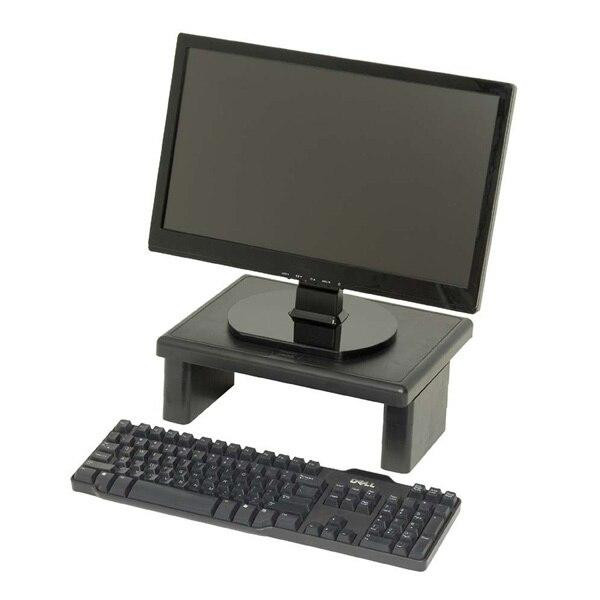
If your team spends the day craning down at a screen that sits too low, the DAC MP107 monitor riser is a small change that pays off quickly. It lifts your monitor to a more comfortable viewing height while opening up tidy storage underneath — a simple ergonomic upgrade for any desk.
Why a monitor riser matters
Screen height is one of the easiest ergonomic wins to get right, and one of the most commonly overlooked. When a monitor sits too low, people tilt their heads forward to read it, and that forward lean is what leads to the familiar neck and upper-back ache by mid-afternoon. Raising the screen so the top of the display sits roughly at eye level encourages a neutral, upright posture.
That benefit reads differently across the workplaces we serve. In offices, it supports staff who sit at the same desk for hours and helps with broader workstation setup. In schools, it tidies up shared computers in labs, libraries and staff rooms while modelling good habits for students. In hospitals and clinics, ward clerks, reception teams and administrative staff often work at busy, shared workstations — a riser lifts the screen to a sensible height and frees up the desk surface beneath for paperwork, charts and handover sheets.
Features and benefits of the DAC MP107
The MP107 keeps things deliberately simple. Its key features include:
- Ergonomic design that elevates the monitor to a comfortable height, reducing strain on the neck and back.
- Durable construction from high-quality materials, able to support up to 44 pounds (roughly 20 kg).
- Non-slip padded feet that keep the monitor securely in place.
- Extra storage space underneath, helping keep the desk organised and clutter-free.
- Slim design that integrates easily into any workspace.
- Quick, simple assembly so it is ready to use without fuss.
The finish is a sleek, modern black that suits most desks, and DAC has been designing ergonomic accessories — mouse pads, monitor stands, wrist rests and footrests — since 1981, with a focus on comfort, durability and value.
Three ways to put it to work
In the office
Pair the riser with a standard desktop monitor to bring the top of the screen up to eye level, then use the space underneath to park a keyboard, notebook or a stack of letterhead when the desk needs clearing. It is a tidy way to give a shared hot-desk a consistent, comfortable setup.
In the classroom
Computer labs and library terminals take a beating, and screens are often set far too low for taller students and staff. A riser lifts the display, and the clear space below is handy for storing a keyboard or a class set of worksheets between lessons — keeping shared stations neat and ready for the next group.
In the hospital or clinic
Reception desks, ward clerk stations and admin offices run long hours across multiple shifts. Raising the monitor helps staff hold a more upright posture, while the storage beneath keeps the bench clear for the trays, folders and forms that pile up at a busy workstation. Because the desk surface stays tidy, it is easier to keep the area clean between users.
A quick how-to for getting the height right
Setting up a riser well takes a minute. Sit back in your chair as you normally would, look straight ahead, and aim for the top of the screen to land at or just below eye level so your gaze drops slightly to read. Keep the monitor about an arm's length away. If you wear multifocal or bifocal glasses you may prefer the screen a touch lower, since you tend to look through the lower part of the lens. The MP107's slim platform makes it easy to slot into an existing setup, and the padded feet mean you can position it without it sliding around.
If you are kitting out several desks at once, it is worth thinking about the whole workstation — chair height, keyboard position and screen distance all work together. A riser is a sensible, low-cost first step in that bigger picture.
Ready to raise your screen?
The DAC MP107 Monitor Riser in black is a straightforward way to improve comfort at the desk, whether you are setting up one workstation or a whole floor. Browse the full range of laptop risers and monitor stands to compare options, and explore our wider ergonomic accessories to round out a comfortable, tidy workspace. Full technical details are available on the manufacturer's specification sheet.
Recent Posts
-
Sketchbook for Drawing: How to Choose the Right One
Ever had a brilliant drawing idea, only to find your paper bucklin …13th Oct 2026 -
School Supplies Checklist: What Every Student Needs
As the new school year approaches, many parents find themselves as …6th Oct 2026 -
Why Stationery Is an Essential Part of Mindfulness Practices
In our fast-paced, technology-driven world, finding moments of cal …29th Sep 2026